How to Assign Left and Right Photos for 58th Floor AI (No Face Swap)
How to assign left and right photos on 58th Floor AI so your duo clip matches the hanging-mic demo: Left replaces the left performer, Right replaces the right—prevent swapped faces without rewriting the locked prompt.
 58thfloor
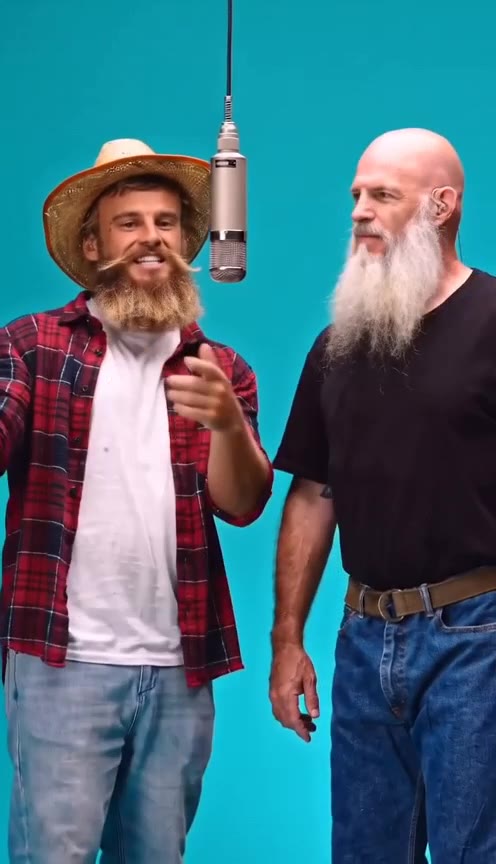
How to assign left and right photos on 58th Floor AI: open the homepage create form, watch the hanging-mic demo once, put your Left photo on the person who should stand on the left of the microphone (viewer’s view) and your Right photo on the person who should stand on the right, keep the locked duo prompt, then generate. Correct Left/Right assignment is how you prevent swapped faces on this studio clip.
This guide is for anyone searching how to assign left and right photos, how to do Left/Right uploads, or how to stop a duo render from looking like a face swap on 58thfloorai.com.
Left vs Right (stage side)
Labels match your view of the demo—not the performers’ own left/right.
| UI label | Stage side (viewer view) | What it replaces |
|---|---|---|
| Left | Left of the hanging microphone | The person standing on the left in the demo |
| Right | Right of the hanging microphone | The person standing on the right in the demo |
Internally the create form maps Image 1 → Right person and Image 2 → Left person. Prefer the Left / Right labels you see in the UI; if you see Image 1 / Image 2 elsewhere, keep that same mapping.
How to do it step by step
- Open the 58th Floor homepage create form and play the hanging-mic demo.
- Decide who should stand left of the mic and who should stand right—from the same viewer angle as the demo.
- Upload Left — one clear adult portrait for the left-side person (JPG, PNG, or WebP, up to 10 MB).
- Upload Right — a separate clear adult portrait for the right-side person (same formats and size limit). The two slots are independent; filling one does not block the other.
- Leave the prompt locked. Do not write a freeform prompt to “fix” sides. The duo path already binds each photo to its stage side.
- Check credits in the composer (authoritative). Seedance Mini is about 10 credits per 12s at 720p; a 15s 720p Mini run is about 13 credits; 480p costs less. Details: pricing.
- Generate, review both faces through close-ups and wides, then download the MP4. Failed renders return credits.
Why the wrong order looks like a face swap
The motion, cuts, and soundtrack follow a fixed studio reference. Your photos only replace the two looks. If you put person A in Left when you meant them on the right of the mic, the model still places that photo on the left-side performer—so after cuts it looks like the faces “swapped.” That is usually upload order, not a random identity glitch.
Fix: swap the two uploads and run again. Do not paste a long custom prompt hoping to flip sides—the duo path ignores freeform prompt edits for side assignment.
Photo tips
- One adult per image — two separate files, not one group shot
- Clear faces, even light, front or slight three-quarter views
- Distinct clothing so the two roles stay easy to tell apart
- Roughly similar framing between the two photos
- Only photos you have permission to use
FAQ
How to assign left and right photos on 58th Floor AI? Match the demo from the viewer’s seat: Left photo → left of the mic, Right photo → right of the mic. Keep the locked prompt and generate on the homepage.
How to do Left/Right so faces do not swap? Watch the demo once, assign each person to the side you want on stage, then upload into those labeled slots. If the result looks reversed, swap the two photos and generate again.
Do I need to write a prompt to lock sides? No. The studio duo path uses a locked prompt. Side binding comes from the Left/Right uploads, not from freeform text.
What if I only have one photo of both people? This flow needs two separate files—one adult per image.
How many credits does a duo take? The live composer is authoritative. As a guide: Seedance Mini ≈ 10 credits / 12s at 720p; 15s 720p Mini ≈ 13 credits; 480p is cheaper. See pricing. Failed renders return credits.
Next steps
Create the clip on the homepage create form. Credit packs and rates: pricing. Full duo walkthrough: How to make an AI duo video from two photos.