How to Make an AI Duo Video from Two Photos (Studio Rap Clip)
How to make a short AI duo rap video from two separate photos on 58thfloorai.com: assign Image 1 to the right of the mic and Image 2 to the left, keep the locked prompt, check credits (15s 720p Mini is 13), then generate and download.
 58thfloor
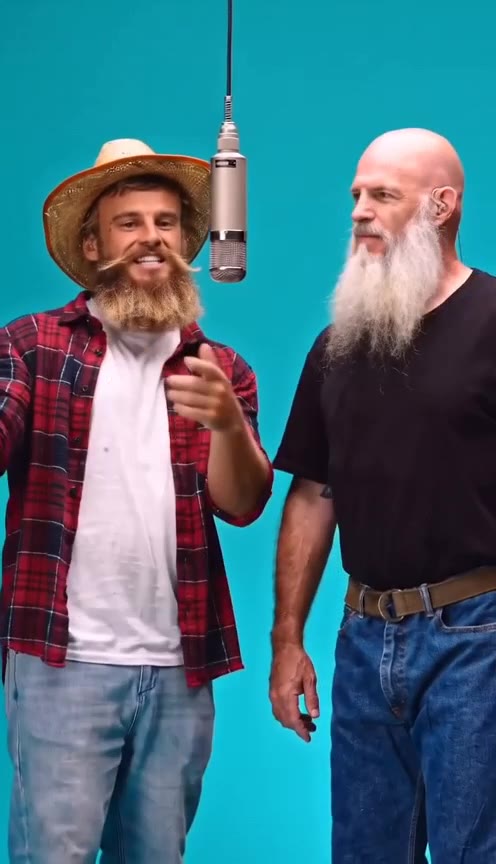
How to make this AI duo video: open 58 Floor, upload two clear adult portraits, put Image 1 on the person who stands right of the hanging mic and Image 2 on the person who stands left, keep the locked studio prompt, confirm credits, then generate and download the MP4.
This page matches the search intent for how to make an AI video from two photos and how to do a duo image-to-video clip without filming together. The homepage create form on 58thfloorai.com turns two stills into one ~12–15 second studio duo on a solid teal stage with a hanging silver microphone. The motion, cuts, and soundtrack follow a fixed reference; your photos only replace the two performers’ looks.
What you need before you start
- Two separate photos (JPG, PNG, or WebP), one adult per image
- Clear faces, visible torso or full body when possible, and distinct outfits so the two roles stay separable
- Consent from both people shown
- An account with enough credits (the composer shows the total before you send)
Avoid group shots as a substitute for two files. Avoid pairing one sharp full-body photo with one tiny blurry headshot.
How to do it step by step
- Open the generator on the 58 Floor homepage create card. Play the demo so you know which performer stands left vs right of the mic.
- Add Image 1 — this replaces the performer who begins on the right of the hanging microphone (the bald / right-side role in the reference).
- Add Image 2 — this replaces the performer who begins on the left of the mic (the straw-hat / left-side role in the reference).
- Leave the prompt locked. You do not write a freeform prompt for this duo; the site already binds each photo to the correct side so identities do not swap after cuts.
- Pick length and quality when the picker is available (12s or 15s with Seedance Mini). Default quality is 720p. As of 2026-11-03 on this site, Seedance 2.0 Mini costs 10 credits per 12 seconds at 720p and 5 at 480p, rounded up for longer clips — so a 15-second 720p Mini render is 13 credits, and 15-second 480p is 7 credits. The live composer is authoritative.
- Sign in if asked, confirm you have enough credits, then generate.
- Review both faces through the close-up and wide shots, then download the MP4. Failed renders return credits.
Why left/right assignment matters
People searching how to make two people dance or rap with AI from photos often upload in the wrong order and think the model “swapped faces.” On this clip the assignments are fixed:
| Slot | Stage side |
|---|---|
| Image 1 | Right of the hanging mic |
| Image 2 | Left of the hanging mic |
If the people look swapped after generate, swap the two uploads and run again. Do not paste a long custom prompt hoping to fix sides — the duo path ignores freeform prompt edits.
Photo tips that improve likeness
- Front-facing or slight three-quarter views work better than heavy profiles
- Even light, unobstructed faces, and clothing that differs between the two people
- Match roughly similar framing between the two photos so one person does not dominate
- Keep hands and feet in frame when you can; the wide shot shows footwear
Credits and packs (publish-safe facts)
One-time packs as configured for this product include Single ($9.99 / 10 credits), Duo Pack ($29 / 50 credits), and larger packs on pricing. A single 15s 720p Mini duo needs 13 credits, so the 10-credit Single pack alone does not cover that setting — use 480p, buy a larger pack, or add credits. Pack credits for one-time purchases do not expire on the published pricing rules for this site; check pricing before you buy.
FAQ
How to make an AI video from two photos without filming together? Upload one photo per person into Image 1 and Image 2 on the homepage create form, keep the locked duo prompt, generate, then download.
How to do the left/right roles correctly? Image 1 = right of mic, Image 2 = left of mic. Watch the on-page demo once before you upload.
Do I need to write a prompt? No for this studio duo. The prompt is locked so each photo stays on its assigned side through every cut.
Can I use one photo of both people? Not for this flow. The generator expects two separate files.
Make the clip on the homepage create form. Pack list: pricing.